Self-Hosted Claude Managed Agents for Enterprises
Your team wants to hand real work to a Claude agent — fixing a broken build at 2 a.m., working through the bug backlog, running tests before a release, triaging alerts. The agent can do it, but it needs keys into your repos and internal systems. Then security asks one question: do credentials and code leave company infrastructure? If yes, the project stops.
On November 12, 2026, Anthropic opened the private beta of Self-hosted Claude Managed Agents — the entire agent service runs in the enterprise’s own cloud or data center. This article explains what moves inside the firewall, what the enterprise operates itself, and the limits to know before requesting access.
What Managed Agents is, and why there are three tiers
Managed Agents is Anthropic’s API set for running long-running autonomous agents. Instead of each model call being a standalone request, it provides a harness (the agent loop), sandboxes (where code runs), credentials, and session history: an agent runs for hours, keeps state across disconnections, and every step is logged.
The service went through three tiers in 2026:
- April 2026 — hosted: Anthropic operates everything. You call the API; agents run on Anthropic’s infrastructure, session history lives there.
- May 19, 2026 — self-hosted sandboxes: the agent’s code runs on customer infrastructure, but the harness, credentials, and session history stay with Anthropic.
- November 12, 2026 — fully self-hosted (private beta): the whole service moves to the customer — harness, sandboxes, credentials, session history — with the same APIs as the hosted service.
The third tier is the real change for heavily regulated enterprises: before, putting the whole service inside your own security perimeter meant building the agent platform yourself.
What moves inside the firewall, and what stays outside
The easiest misunderstanding: self-hosting the agent service does not mean the model runs in-house.
| Component | Hosted | Self-hosted (beta) |
|---|---|---|
| Harness (agent loop) | Anthropic | Enterprise |
| Sandbox running shell/file tools | Anthropic | Enterprise |
| Credentials (vault) | Anthropic | Enterprise |
| Session history | Anthropic | Enterprise |
| Claude model | Chosen provider | Chosen provider |
The model still runs outside, and every model call carries the conversation — prompts, tool inputs, tool results — to the provider. The enterprise chooses the provider through inference.provider: the Claude API by default, or Amazon Bedrock, Claude Models on Google Cloud, Microsoft Foundry, or its own gateway. When the provider is the Claude API, the organization’s zero data retention (ZDR) agreement applies to those calls like any other Messages API call.
Self-hosting solves the control-plane and stored-data problem, not the on-premise model problem.
Architecture: three components the enterprise operates
flowchart LR
    A["Dev / SDK / ant CLI / console"] --> B["cma-server<br/>Managed Agents API :8400"]
    B --> C["PostgreSQL 16+<br/>agents, sessions, history"]
    B --> D["Workers"]
    D --> E["Sandbox<br/>shell + file tools"]
    B --> F["Inference provider<br/>Claude API / Bedrock / Vertex / Foundry / gateway"]
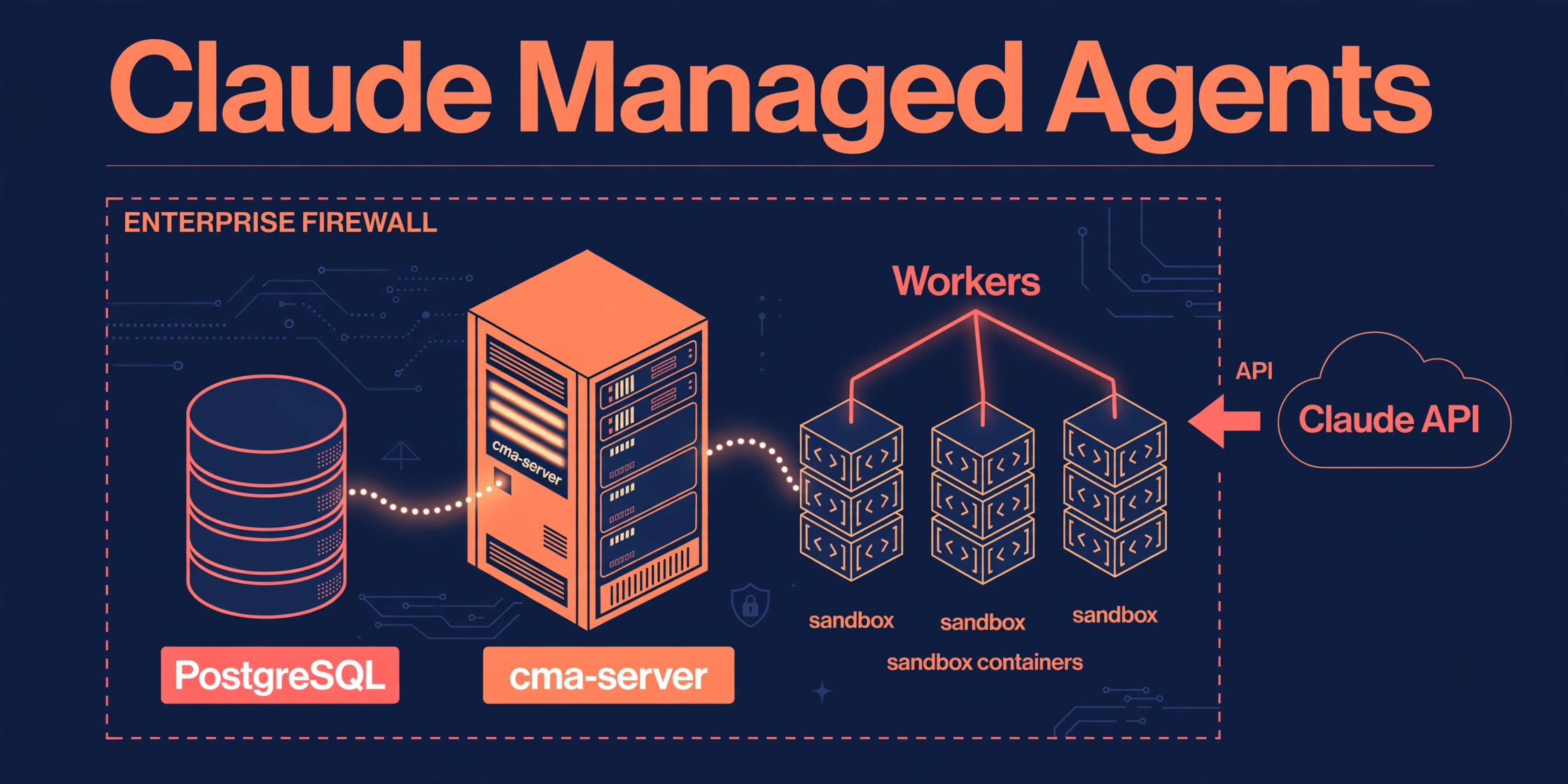
1. cma-server — the Managed Agents server. It serves the same Managed Agents API as the hosted service, runs the agent loop, and stores agents, sessions, and history. It never runs an agent’s shell or file tools — that belongs to workers. It listens by default on 127.0.0.1:8400.
2. PostgreSQL 16 or later. All agents, sessions, and session history live in the enterprise’s database. Without one, the server keeps everything in memory, and a restart wipes it.
3. Workers — where the agent’s tools run. A worker takes work from the server and runs shell and file tools inside the sandbox; the server never connects to a worker — workers poll it. The trial Docker Compose stack starts 10 workers by default, each serving one session at a time.
Try it with Docker Compose, run it for real with Helm
Anthropic draws a clear line between the two deployment paths.
Trial: Docker Compose on one machine. The release archive (request it from your account team) extracts to a compose directory with docker-compose.yml and compose.config.yaml. You need a host with at least 2 CPUs, the latest Docker Engine with the Compose plugin, a Claude API key, and the ant CLI. The stack names its environment compose-sandbox; the server is ready when readiness returns "status":"ready".
Compose serves plain HTTP and is not for production — evaluation and testing only.
Production: Helm on Kubernetes 1.30 or later. The release archive holds two charts: cma-server (applies the database schema, runs two servers behind a Service, namespace cma-server) and cma-sandboxes (a dispatcher and sandbox pods, namespace cma, one pod per session). You also need the Agent Sandbox controller, nodes running gVisor, and a network plugin that enforces NetworkPolicy.
Before upgrading a server, back up the database first (minor and major upgrades change the schema); the dump holds every conversation as plain text, and the docs show how to encrypt it with age before storing it.
Security: four principles, and the work left for the ops team
Anthropic designed Managed Agents around four principles, which apply at all three tiers:
Brain and hands are split. The harness (brain) calls Claude; the sandbox (hands) runs the agent’s code. The agent loop, session history, and vault secrets live outside the sandbox.
Credentials stay out of the sandbox. The vault keeps credentials outside the sandbox; a proxy outside the sandbox attaches the credential to the request for supported MCP tools and API calls.
Network access can be limited. Each environment is limited to a list of allowed hosts — for a build-fixing agent, that list might be just the Git host and the package registry.
Every session leaves a full record. Managed Agents records every step an agent took, including tool calls and what came back. The record exports over OpenTelemetry to the monitoring tools the team already uses.
But self-hosting also moves operational responsibility to the enterprise: securing the server, database, and sandboxes; detecting unusual usage; installing each release. The server API key reaches every environment in a deployment, and code an agent runs in a sandbox can use any credential that sandbox holds — so each session runs in its own sandbox. The Prometheus metrics endpoint is off by default; when on, it asks for no credential, so block it by listen address or NetworkPolicy.
The server license also sets real deadlines: deploy a Safety Update within 1 business day; when Anthropic flags a feature or version as risky, disable the feature or roll back within 8 hours. The license is royalty-free, but it forbids use with third-party models unless the docs allow it, and requires reporting an agent incident within 48 hours.
What the self-hosted server does not have
The private beta is not a full copy of the hosted service. Per the Differences page in the official docs, 7 features are missing:
| Missing feature | What to do instead |
|---|---|
Cloud environments (only self_hosted) | Deploy self-hosted workers for every environment |
| Messages API and Models API on the server | Call the Claude API or your provider from a separate client |
| File session resources and the Files API | Put files in the worker’s working directory |
mcp_oauth vault credentials | Store the token as static_bearer, rotate it yourself |
| Prebuilt docx, pdf, pptx, xlsx skills | Download sources from the skills repo, upload as custom skills |
| Scheduled deployments and dreams | Start sessions from your own scheduler (cron); dreams have no replacement |
| Webhooks | Follow sessions through the event stream, keep workers running to poll |
Web search and web fetch are also off by default — turn them on in the settings file; availability depends on the inference provider (web search: Claude API, Google Cloud, Foundry; web fetch: Claude API, Foundry). Multiagent orchestration narrows too: an agent delegates only to pre-listed subagents, type coordinator, at most 20.
And the most important point for teams already on the hosted service: there is no migration path. The docs state it plainly: nothing is copied from the hosted service, session history included. Agents, skills, vault credentials, and memory stores must be created again on the new server. The dreams feature for agent memory — see the Anthropic agent memory article — is also unavailable.
Quick comparison: three tiers, and where Bedrock AgentCore stands
| Criteria | Hosted | Self-hosted sandbox | Fully self-hosted (beta) |
|---|---|---|---|
| Who operates the harness | Anthropic | Anthropic | Enterprise |
| Where sandboxes run | Anthropic | Enterprise | Enterprise |
| Where credentials + session history live | Anthropic | Anthropic | Enterprise |
| Where model calls go | Chosen provider | Chosen provider | Chosen provider |
| Scheduled deployments, dreams, webhooks | Yes | Yes | No |
| Fits | Quick trials, small teams | Code must not leave home | Strict compliance, self-operated |
On cost: the hosted service bills tokens at model rates plus $0.08 per running session-hour; the self-hosted server has no published price — the license is royalty-free, and model spend follows the chosen provider.
Another option is Claude Code on AWS Bedrock AgentCore: an agent runtime on AWS, a fit for teams standardized on AWS. Self-hosted Managed Agents is Anthropic’s control plane inside the enterprise’s own infrastructure — a fit for multi-cloud or on-premise teams. If you only need to call many models through one OpenAI-compatible API, LiteLLM is much lighter.
Who should care, and how to request access
The self-hosted server targets enterprises with three traits: agents about to touch real code and internal systems; rules requiring credentials and session history to stay inside company infrastructure; and an ops team able to carry one more service. For small trials, the hosted service is faster; if only the code must stay home, self-hosted sandboxes are enough — and they are public beta.
Private beta access currently goes through an Anthropic account team only, for eligible organizations. Anthropic has announced no GA date or beta customers. Teams that want to evaluate should contact their account team, and read three docs pages first: the quickstart, Differences, and Data and access.
Lessons learned
- Self-hosting the agent service does not mean the model runs in-house. Model calls still go to the chosen provider; self-hosting solves the control plane and stored data, not on-premise models.
- The biggest benefit is control, not saving money. There is no published server price, and the enterprise operates the server, database, and workers.
- Read the Differences page before committing. Seven missing features, no replacement for dreams, web tools off by default, nothing migrates from hosted — architecture decisions, not temporary bugs.
- One deployment serves one tenant. To separate tenants or trust levels, split deployments, each with its own database, server API key, and workers.
- The license carries real deadlines. Safety updates within 1 business day, rollbacks within 8 hours, incident reports within 48 hours — the ops team needs an update process before production.
Verification scope
Checked on November 14, 2026 against Anthropic’s official announcement (November 12, 2026), 6 docs pages on platform.claude.com, and the server license. The hosted $0.08/session-hour figure follows Anthropic’s pricing page, cited identically by several secondary sources — a cost reference, not an independently measured number. The figures 10 default workers, the 100 KiB MCP result cut, and ports 8400/8410/9464 are default configuration, not benchmarks. Web tools, OpenTelemetry, Prometheus metrics, and the egress gateway are all off by default. The server was not run by hand: a private beta through an account team, with no release access.
References
- Anthropic, “Operate Claude Managed Agents inside your security perimeter”, Nov 12, 2026: https://claude.com/resources/articles/self-hosted-claude-managed-agents
- Anthropic docs, “Get started with self-hosted Claude Managed Agents”: https://platform.claude.com/docs/en/managed-agents/self-hosted/quickstart
- Anthropic docs, “Differences from the hosted service”: https://platform.claude.com/docs/en/managed-agents/self-hosted/differences
- Anthropic docs, “Data and access in self-hosted Claude Managed Agents”: https://platform.claude.com/docs/en/managed-agents/self-hosted-data-and-access
- Anthropic docs, “Deploy on Kubernetes”: https://platform.claude.com/docs/en/managed-agents/self-hosted/kubernetes
- Anthropic, “Software License Agreement: Claude Managed Agents Server”: https://www.anthropic.com/legal/self-hosted-managed-agents-license
Bình luận
Bình luận được duyệt trước khi hiển thị.Đang tải bình luận…
Để lại bình luận